THE YEARLY CALENDAR FOR MAC
Your year.
Beautifully in view.
Big plans. Little moments. The whole picture.
Bring your year together with yCal2.
Made for macOS · macOS 13 or later
A FRESH PERSPECTIVE
Life doesn’t happen
one month at a time.
See the connections between your days. From a long-awaited holiday to a busy season at work, yCal2 gives every plan its place in the bigger picture.
A whole year. At a glance.
Twelve clear columns keep your year in view, without flipping between months.
Make your mark.
Highlight the days that matter, just as you would on a paper calendar.
Right at home on Mac.
Rebuilt for macOS. A familiar, focused companion for your existing calendars.
THOUGHTFUL BY DESIGN
A little color.
A lot of clarity.
Simple at a glance.
Powerful when you need it.
Make the important
days stand out.
Vacations, business trips, family time. Give them their own colors and styles, and find your bearings in an instant.

Find a pattern.
Let yCal2 mark it.
Create a Regular Expression search to find matching events in selected calendars, or all of them. Your Smart Markers bring those days into focus automatically.
Less searching. More seeing.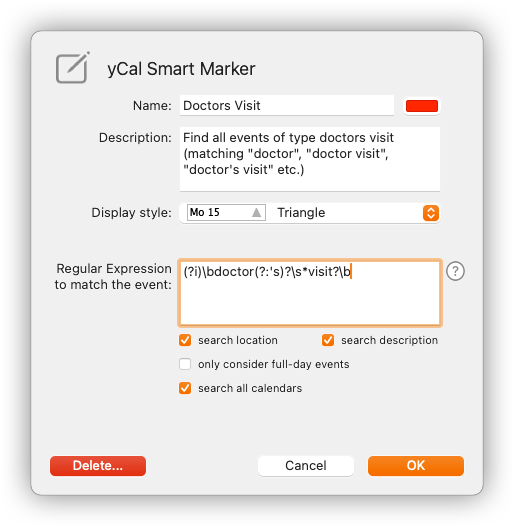
The big picture.
The little details.
Double-click a day or press the spacebar to see its events and add a quick note. Your notes appear in the year view, like a thought scribbled on a paper calendar.
space A closer look at your day.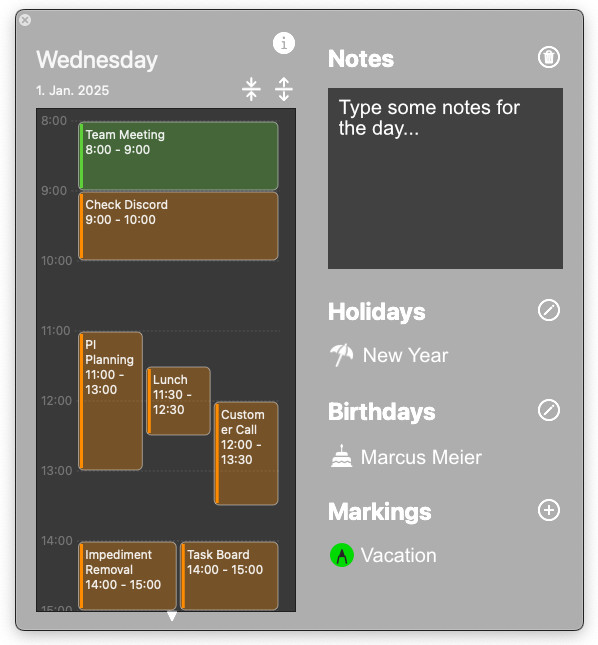
More room for
the good days.
Bring holiday calendars into your year view and choose which days count as time off. Gather birthdays from your calendars, so the people who matter are easy to spot.
Days off. Birthdays. All together.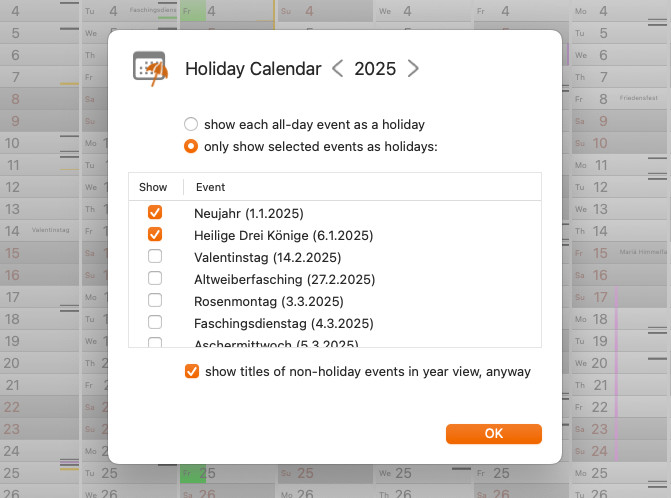
YOUR CALENDARS. ALWAYS YOURS.
Your year.
Your data.
No lock-in.
Every marker, every note, every holiday and birthday is stored as a normal calendar event. Your information stays accessible from other calendar apps, too.
yCal2 works with the calendars on your Mac and doesn’t collect your personal information. Calendar syncing is handled by macOS and your calendar providers.
Our approach to privacyWhat do I need to run yCal2?
yCal2 is made for Mac and requires macOS 13 or later. Download it from the Mac App Store.
Does it work with my existing calendars?
Yes. yCal2 accesses the calendars configured on your Mac, with your permission. Calendar services such as iCloud or Google sync through macOS, according to your system settings.
What makes a Smart Marker smart?
Smart Markers use Regular Expression searches to find matching events and mark their days automatically. You can search selected calendars or all your calendars.
Where are my markers and notes stored?
They’re stored as normal calendar events, so you can access them from other calendar programs. Your data remains accessible even if you stop using yCal2.

A BETTER VIEW STARTS HERE
Make room for
your whole year.
Meet your new favorite way to see what’s ahead.
 For Mac · macOS 13 or later